Updated 21 September 2026
Works on a plane, a train and bad hotel wifi
What it is
Taskr installs from the browser as a progressive web app: its own window, its own icon, no address bar, and a faster start than a fresh tab. Installed, it also keeps the workspace you have open on the device — the lists, the tasks, the subtasks and the notes, bodies included — so the board is still there when the connection is not.
When you would use it
You are on a train to a client meeting and the wifi drops between two stations; you still want to read the "what we agreed" note and the deadline list you were working from. Or you are on a plane and want the week's plan in front of you without paying for the seat-back internet. Installed on a phone, Taskr behaves like any other app icon on the home screen, and the same board is on the desktop because nothing is stored only on the device.
How it works in Taskr
- Install it from the card in the app. When your browser can install Taskr, a card appears with Install app and Not now; the second one hides it for 30 days. The same entry point lives permanently in Settings → About.
- Android and iPhone differ slightly. Chrome on Android offers the same install dialog and puts Taskr on the home screen; on iPhone and iPad, use Safari's Share → Add to Home Screen. Safari on macOS installs from File → Add to Dock. Firefox and in-app browsers do not offer installation at all.
- Open the workspace you will need online first. The offline copy is made from what you have already loaded: the dashboard, the workspace, its lists and tasks, its notes — that is what gets stored on the device.
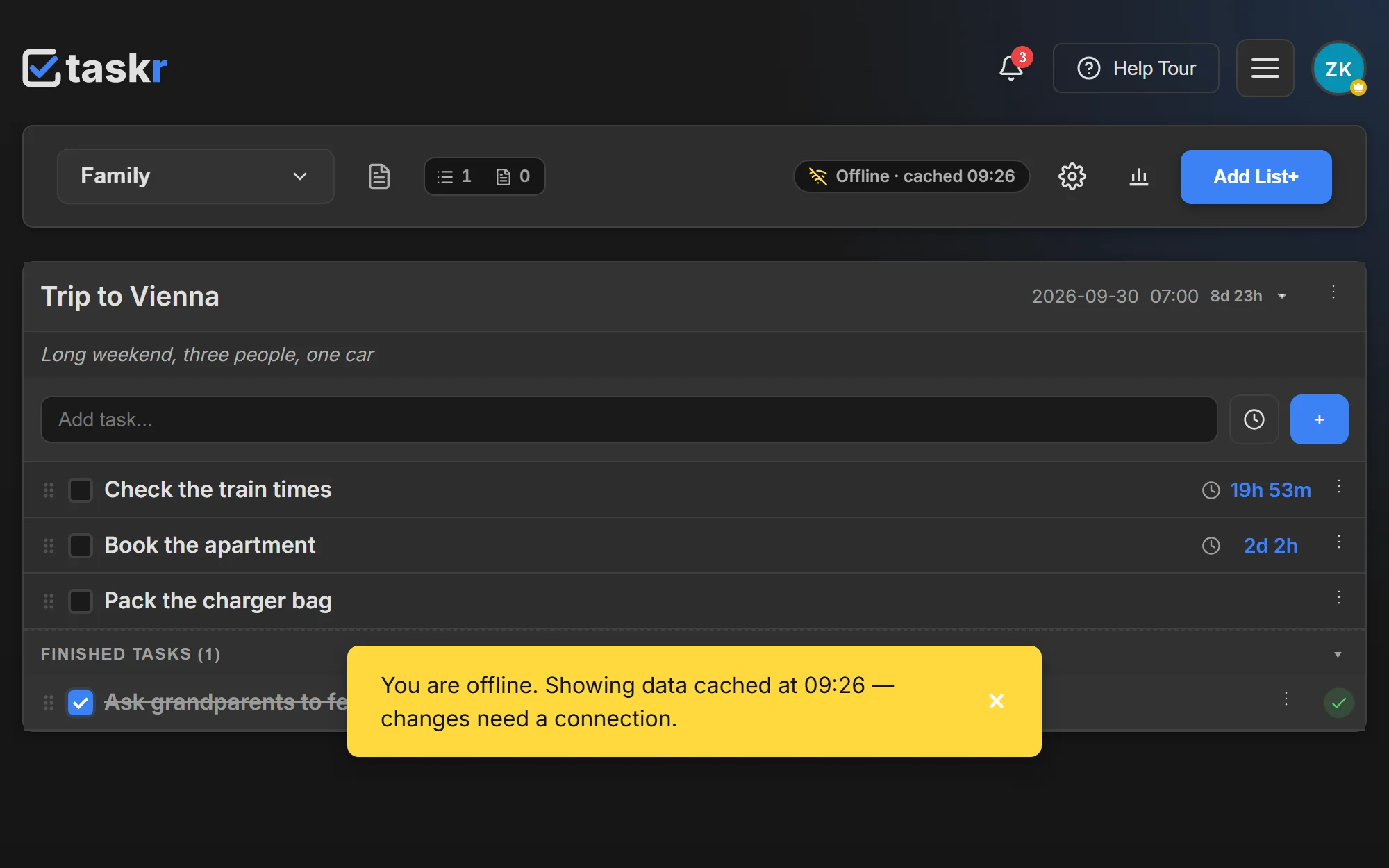
- Work offline and watch the chip. With no connection the board keeps rendering that copy and the toolbar shows Offline · cached 14:32, so you always know you are looking at the last sync rather than at live data.
- Clear the copy when you want to. Settings → About → Clear offline data deletes what is stored on that device; it is downloaded again the next time you are online.
What to watch out for
Editing while offline is not supported yet. The cached copy is read-only: the app says it plainly ("changes need a connection"), and a change you try to make without a connection is not queued and replayed later — it simply does not go through. Reading is what works offline today; the queue that would replay offline edits is a later phase of the offline work, and the copy in the app says so rather than promising it. A screen you have never opened while online is not cached either, and says so: "This screen has not been saved for offline use yet. Reconnect and open it once." The copy on the device is scoped to the signed-in account, kept for 7 days and capped (400 entries, about 50 MB per user), and the browser's own storage limits apply on top. And because everything lives on the server, the installed app is the same account — not a second, separate to-do list.
Where to go next
- Workspaces, for what exactly gets cached when you open a workspace
- Countdown timers, which keep counting on the cached board
- Guide: Install Taskr on desktop, Android and iPhone
Create a free account and install the board you already use — it is on every plan.
Ready when you are.
Create a free account